Introduction
This blog presents a MikroTik-based Internet connectivity architecture designed to demonstrate how an organization can establish external connectivity through both Internet Exchange Point (IXP) peering and an upstream transit provider. The architecture uses BGP to exchange routing information, allowing the network to establish direct peering with other networks at the IXP while maintaining transit connectivity for destinations that are not reachable through the peering fabric.
The design provides a simplified view of the roles of the MikroTik edge router, IXP switching infrastructure, route server, and transit provider, and illustrates how these components work together to provide resilient and efficient Internet connectivity.
Topology
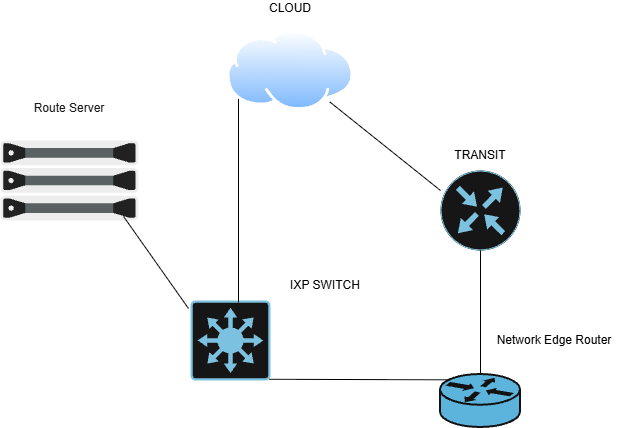
The topology above illustrates a MikroTik-based network edge router connected to both an upstream transit provider and an Internet Exchange Point (IXP). This design demonstrates how a network can use both transit and peering to reach external networks.
The MikroTik edge router maintains a connection to the transit provider, which provides broader Internet reachability. In this example, the transit provider provides a path to the cloud network. This means that even if the cloud network is not directly reachable through the IXP, traffic can still reach it through the upstream transit connection.
The MikroTik router also connects to the IXP switching fabric. The cloud network is another participant connected to the same IXP. Through BGP peering at the IXP, the MikroTik router can learn routes to the cloud network and send traffic directly across the IXP rather than sending it through the transit provider.
A Simple Explanation of the Route Server
One of the components shown in the topology is the IXP route server. A route server makes it easier for networks connected to an IXP to exchange routing information.
Without a route server, if several networks wanted to peer with each other, they would need to establish individual BGP sessions with one another. As the number of participants grows, this can become difficult to manage.
The route server provides a simpler approach. Participants establish a BGP session with the route server and advertise the routes they want to share. The route server then distributes those routes to other participating networks.
It’s important to understand that the route server is used for exchanging routing information, not for forwarding the actual traffic. Once the MikroTik router learns that the cloud network is reachable through the IXP, the traffic can travel directly across the IXP switching fabric to the cloud network.
Therefore, in this topology, the network has two possible paths to the cloud:
Through transit:
MikroTik Edge Router → Transit Provider → Cloud
Through IXP peering:
MikroTik Edge Router → IXP Switch → Cloud
When a valid and preferred BGP route to the cloud is learned through the IXP, the MikroTik router can use the direct peering path, allowing traffic to bypass the transit provider. This is one of the key benefits of Internet peering: shorter paths, reduced dependence on transit, and potentially better performance and cost efficiency.
MikroTik BGP Configuration
Configuring the Transit BGP Session
Setting up an eBGP session to a transit provider, with output filtering to make sure we only advertise our own prefix.
Lab details:
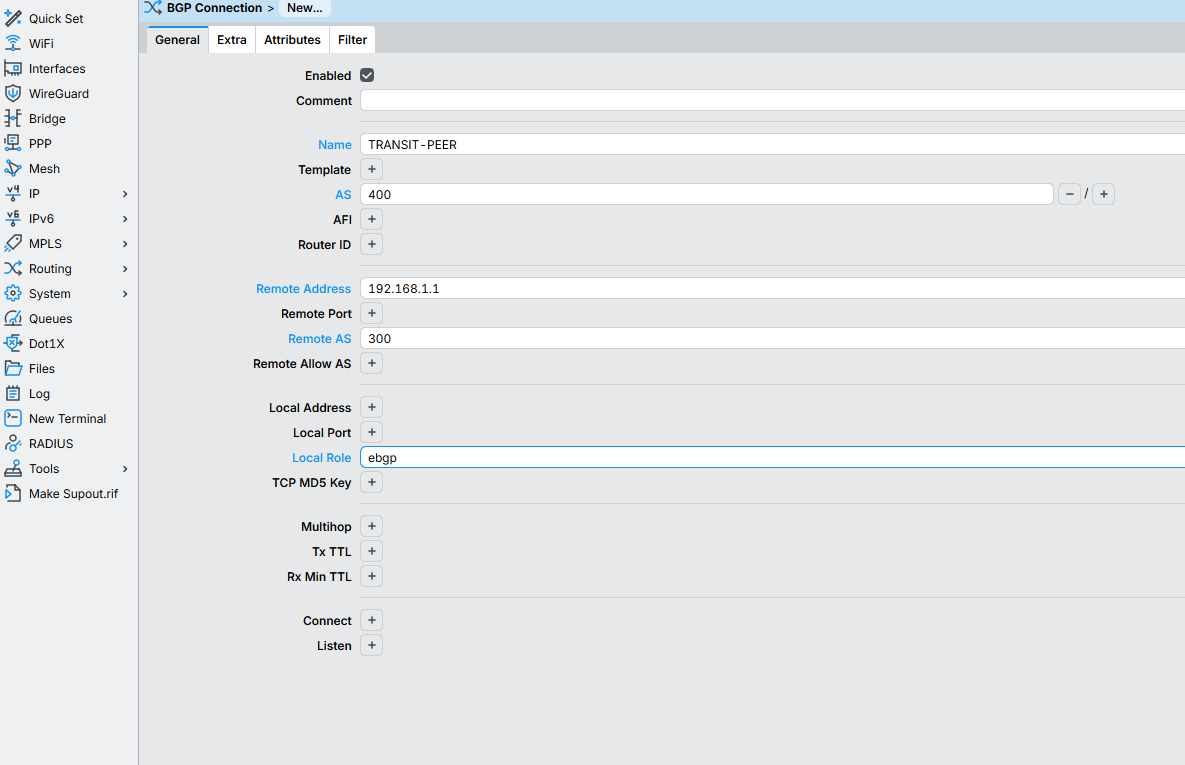
Our AS: 400
Transit AS: 300
Our prefix: 203.0.113.0/24
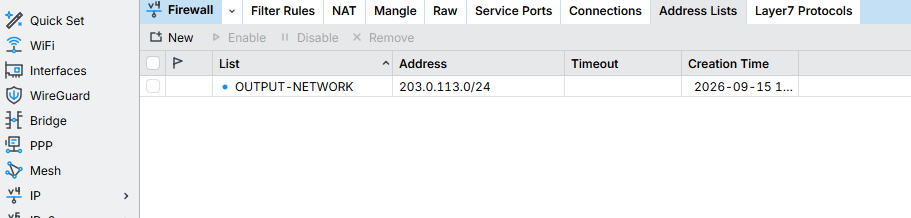
Create the address list
IP → Firewall → Address Lists → New
Create the output filter
Routing → Route Filters → New

Everything not matching this gets dropped by default, only our own /24 goes out.
Set up the BGP connection
Routing → BGP → Connections → New
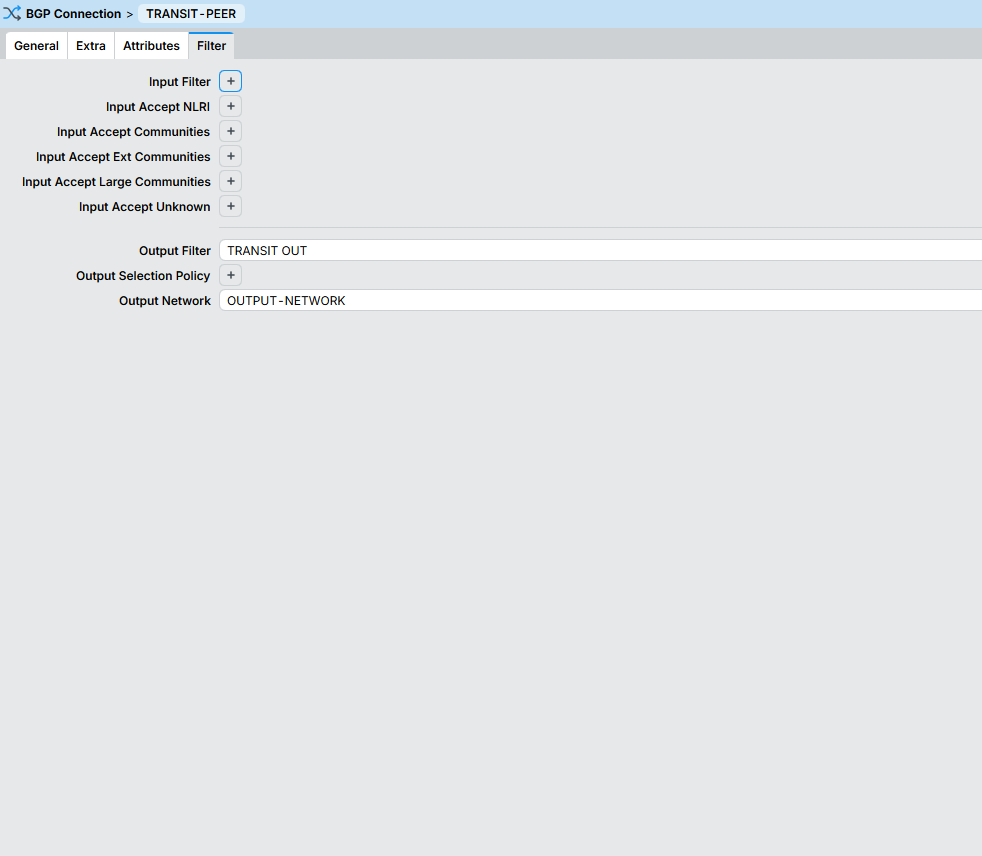
NB:
Address-list = the prefix I want BGP to advertise.
Filter = the rules controlling those advertisements.
Why the filter matters
Without it, we’d advertise everything we know, including routes learned from the IXP or other peers. Transit providers only expect our own prefix. Filtering outbound routes prevents route leaks, which is a common and serious BGP mistake.
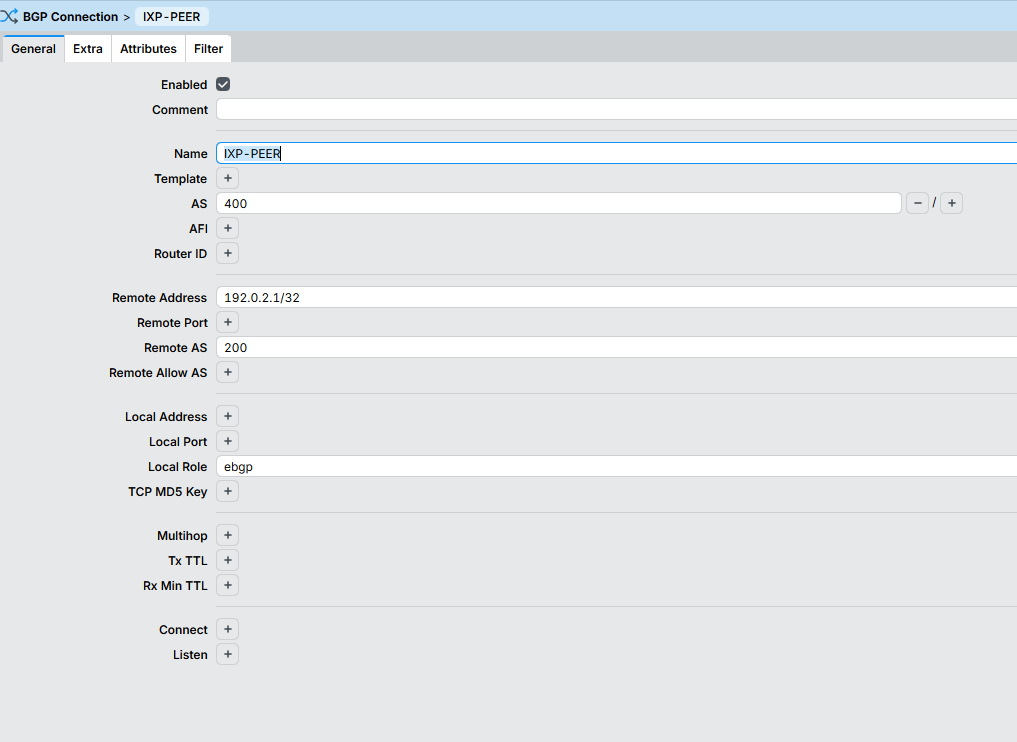
Configuring BGP Peering with the IXP Route Server
Configuring an IXP Route Server Peer
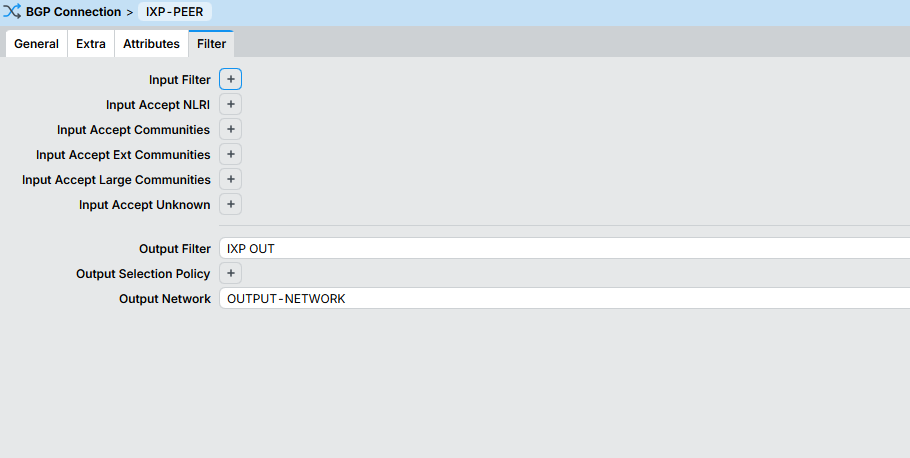
Setting up an eBGP session to the IXP route server, with the same output filtering approach as the transit peer.
Lab details:
Our AS: 400
IXP Route Server AS: 200
Our prefix: 203.0.113.0/24
Routing → Route Filters → New

Same idea as before only our own /24 goes out, everything else is dropped by default.
(We reuse the OUTPUT-NETWORK address list already created for the transit peer, since it’s the same prefix.)
Set up the BGP connection
Routing → BGP → Connections → New
Verifying BGP Sessions
With the peers configured, it’s time to confirm everything’s actually up and talking not just configured.
Checking Sessions on the MikroTik (Our Router)
Routing → BGP → Sessions
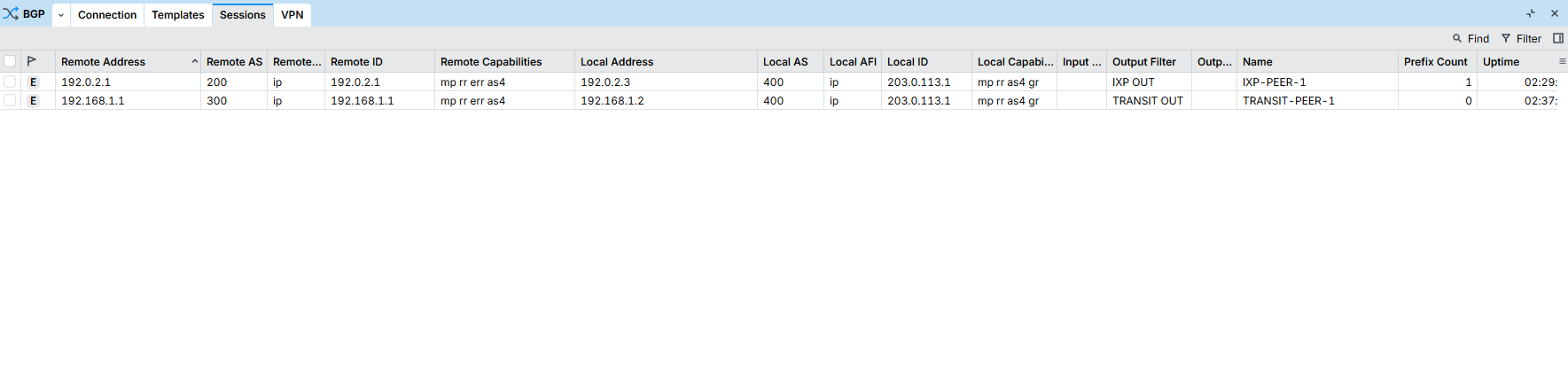
Both sessions show an E flag on the left, that means Established, the state we want. If a session is stuck in Active or Connect, something’s wrong (wrong IP, wrong AS, firewall blocking TCP 179, etc.).
Also worth noting here: the Output Filter column confirms each peer is tied to the correct filter chain (IXP OUT and TRANSIT OUT), so we know the right policy is actually attached to the right session, not just sitting unused.
Checking from the Cloud Router
The Cloud router is connected to both the IXP and the transit router, so it gives a neutral view of both sessions from the other side.

Both neighbors show a PfxRcd of 1 meaning each is receiving exactly one prefix from us, our 203.0.113.0/24. That’s the output filter doing its job: not zero (session isn’t broken), not more than one (we’re not leaking anything extra).
Checking from the Route Server

Our session (AS400) is up and the route server confirms it’s receiving 1 prefix from us again, just our own /24, nothing more.
Checking from the Transit Router

Same pattern here our session (AS400) shows 1 prefix received, confirming the transit side only sees our announced block.
Verifying Routes
Notice Cloud Router actually has two ways to reach 203.0.113.0/24 here one through the Mikrotik router via the IXP switch (192.0.2.3, AS path just 400) and one through the transit router (10.1.1.1, AS path 300 400). BGP picks whichever path has fewer AS hops when everything else is equal, so the IXP route wins since it’s only one hop away instead of two. This lines up with how peering usually works in the real world too, going direct through an IXP is typically shorter and more efficient than routing through a transit provider, so it makes sense BGP picks it automatically without us having to tune anything.
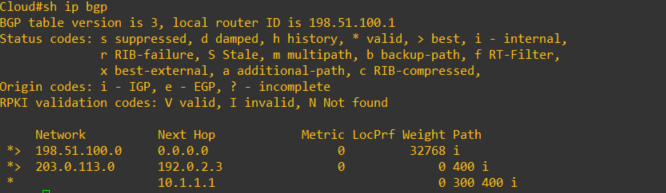
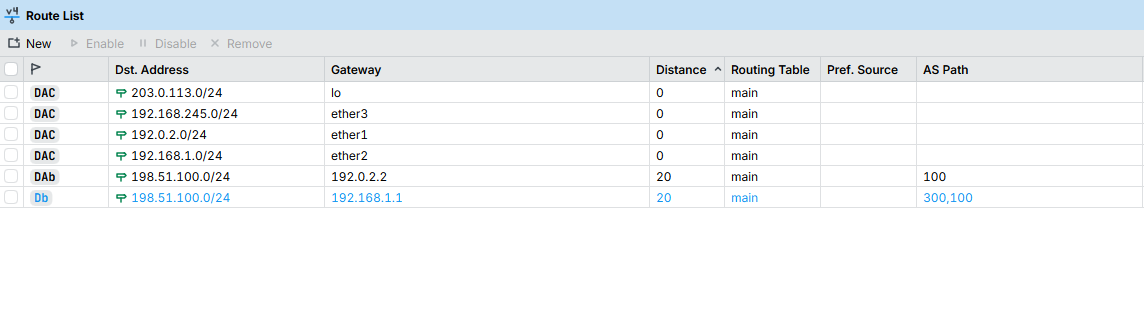
Same story shows up here. There are two candidate routes to 198.51.100.0/24 one via the IXP (192.0.2.2, AS path 100) and one via transit (192.168.1.1, AS path 300,100). Only the IXP one has the little A (active) flag next to it, meaning that’s the one actually being used. The transit route isn’t gone though, it’s just sitting there as a backup. If the IXP session ever drops, MikroTik will automatically switch over to the transit path instead. Same reason as before: shorter AS path wins.
Conclusion
This topology demonstrates how a MikroTik edge router uses BGP to connect to both an upstream transit provider and an IXP. Transit provides broader Internet reachability, while IXP peering enables direct connectivity to participating networks through the IXP switching fabric.